Install DevPortal on Kubernetes
This page installs DevPortal 3.x on Kubernetes with the devportal Helm chart. The portal runs behind an Ingress with TLS, users sign in through an identity provider over OpenID Connect (OIDC), and guest sign-in is off. The steps use Keycloak as the identity provider and a PostgreSQL database that runs in the cluster, so you can follow them on an empty test cluster. Replace the parts that are placeholders before you run the portal for real users.
Chart 1.0.3 and earlier ship guest sign-in enabled and map the guest identity to the ADMIN user (user:default/admin). From chart 1.0.4 the chart ships it disabled. With guest sign-in on, anyone who can reach the portal URL enters as an administrator, without a password. That is useful for a first look and dangerous for anything else. The single off switch is global.veecode.guestAuth.enabled: false, and Step 6 sets it on every chart version. Never expose an installation with guest sign-in on.
Before you start
You need:
- A Kubernetes cluster with an Ingress controller, and
kubectland Helm 3 pointed at it. The steps were followed on k3s 1.31 with its bundled Traefik controller (className: traefik) and Helm 3.20, with chart 1.0.0. Charts 1.0.1 to 1.0.3 change only the image tag, digest, and version metadata. Chart 1.0.4 changes two defaults: guest sign-in is off, and the plugin catalog index is pinned by digest. Chart 1.1.0 enables the default plugins from the catalog index and installs DevPortal 3.1.0. Chart 1.1.1 installs the same image and moves only the catalog index. Chart 1.1.2 installs DevPortal 3.1.1, which changes onlycertifi, and moves the catalog index again. The steps below install chart 1.1.2. The k3s run above did not use it. - Two DNS names that resolve to the Ingress controller: one for the portal and one for the identity provider. The steps use
devportal.example.comandkeycloak.example.com. The portal backend calls the identity provider's public name when a user signs out, so the cluster must resolve and reach that name too (Step 6 covers a cluster that cannot). opensslandcurlon your machine, and a browser that allows pop-ups from the portal: the sign-in button opens the identity provider in a pop-up window.- If the cluster cannot reach a public Helm repository or registry, prepare a local chart archive and mirror before Step 1 by following Install without internet access.
The chart installs no database. The steps run a disposable PostgreSQL in the cluster. For production, use a PostgreSQL that you operate, and give the portal a user that can create databases, because the portal creates one database per plugin.
What you replace for your environment
| Part | What the steps use | What you use |
|---|---|---|
| Hostnames | devportal.example.com and keycloak.example.com | Your own names, set once in Step 1 |
| Certificate | A self-signed certificate that covers both names | A certificate from your certificate authority (CA), stored in the same kind of Secret in Step 2 |
| Trust for the certificate | The portal backend trusts the self-signed certificate, through values-trust.yaml in Step 6 | Nothing, when a public CA signed your certificate and the cluster resolves both names. For a private CA, the CA's own certificate in place of tls.crt |
| Identity provider | Keycloak in the cluster, in development mode | Your own Keycloak or another OIDC provider, which Step 4 lists the settings for |
| Database | PostgreSQL 16 in the cluster | Your PostgreSQL, in the Secret of Step 5 |
| Ingress class | traefik | The class of your controller, in the values file of Step 6 |
Run every command in one terminal session. Later steps use the shell variables that Step 1 sets.
Step 1: Choose names and generate secrets
export NAMESPACE=devportal
export DEVPORTAL_HOST=devportal.example.com
export KEYCLOAK_HOST=keycloak.example.com
export CHART_VERSION=1.1.2
export PORTAL_IMAGE_TAG=3.1.1

export DB_PASSWORD="$(openssl rand -hex 16)"
export BACKEND_SECRET="$(openssl rand -hex 16)"
export AUTH_SESSION_SECRET="$(openssl rand -hex 16)"
export KEYCLOAK_CLIENT_SECRET="$(openssl rand -hex 16)"
export KEYCLOAK_USER_PASSWORD="$(openssl rand -hex 16)"
export POSTGRES_IMAGE="${POSTGRES_IMAGE:-docker.io/library/postgres:16}"
export KEYCLOAK_IMAGE="${KEYCLOAK_IMAGE:-quay.io/keycloak/keycloak:26.3.3@sha256:6a7217a100bd3e5de4063a27a538ef999a3c5a88c4b4ec0ffc0a642aee7b2597}"
Use the bare hostname, without https:// and without a port. The chart builds https:// followed by global.host for the application and backend URLs.
Step 2: Create the namespace and the TLS Secret
kubectl create namespace "$NAMESPACE"

openssl req -x509 -newkey rsa:2048 -nodes -days 365 \
  -keyout tls.key -out tls.crt \
  -subj "/CN=$DEVPORTAL_HOST" \
  -addext "subjectAltName=DNS:$DEVPORTAL_HOST,DNS:$KEYCLOAK_HOST"

kubectl -n "$NAMESPACE" create secret tls devportal-tls --cert=tls.crt --key=tls.key
The certificate is self-signed, so browsers warn about it. With a certificate from your CA, create the same devportal-tls Secret from the certificate and key files you received. The certificate must cover both hostnames. Keep tls.key private.
Step 3: Start PostgreSQL
kubectl -n "$NAMESPACE" create secret generic devportal-db \
  --from-literal=POSTGRES_USER=devportal \
  --from-literal=POSTGRES_PASSWORD="$DB_PASSWORD" \
  --from-literal=POSTGRES_DB=devportal

kubectl -n "$NAMESPACE" apply -f - <<EOF
apiVersion: v1
kind: PersistentVolumeClaim
metadata:
  name: devportal-db
spec:
  accessModes: [ReadWriteOnce]
  resources:
    requests:
      storage: 2Gi
---
apiVersion: apps/v1
kind: Deployment
metadata:
  name: devportal-db
spec:
  replicas: 1
  strategy:
    type: Recreate
  selector:
    matchLabels: {app: devportal-db}
  template:
    metadata:
      labels: {app: devportal-db}
    spec:
      enableServiceLinks: false
      containers:
        - name: postgres
          image: $POSTGRES_IMAGE
          envFrom:
            - secretRef: {name: devportal-db}
          env:
            - {name: PGDATA, value: /var/lib/postgresql/data/pgdata}
          ports:
            - {containerPort: 5432}
          volumeMounts:
            - {name: data, mountPath: /var/lib/postgresql/data}
      volumes:
        - name: data
          persistentVolumeClaim: {claimName: devportal-db}
---
apiVersion: v1
kind: Service
metadata:
  name: devportal-db
spec:
  selector: {app: devportal-db}
  ports:
    - {port: 5432, targetPort: 5432}
EOF

kubectl -n "$NAMESPACE" rollout status deployment/devportal-db --timeout=10m
For a PostgreSQL server outside the cluster, see Use an external PostgreSQL database.
Step 4: Start Keycloak
Skip this step if you already run an identity provider. The portal needs an OIDC client with these settings:
- A confidential client with the standard flow on, whose redirect URI is
https://devportal.example.com/api/auth/oidc/handler/frame(your portal hostname). - A service account that can read users and groups, with the
realm-managementrolesview-users,query-users,query-groupsandview-realm. The portal uses it to import your users and groups into its catalog.
The realm below creates that client and one user, alice. Keycloak reads the ${...} values in the realm from the keycloak-env Secret.
kubectl -n "$NAMESPACE" create secret generic keycloak-env \
  --from-literal=DEVPORTAL_HOST="$DEVPORTAL_HOST" \
  --from-literal=KEYCLOAK_CLIENT_SECRET="$KEYCLOAK_CLIENT_SECRET" \
  --from-literal=KEYCLOAK_USER_PASSWORD="$KEYCLOAK_USER_PASSWORD"

cat > realm.json <<'EOF'
{
  "realm": "devportal",
  "enabled": true,
  "clients": [
    {
      "clientId": "devportal",
      "enabled": true,
      "protocol": "openid-connect",
      "publicClient": false,
      "secret": "${KEYCLOAK_CLIENT_SECRET}",
      "standardFlowEnabled": true,
      "directAccessGrantsEnabled": false,
      "serviceAccountsEnabled": true,
      "redirectUris": ["https://${DEVPORTAL_HOST}/*"],
      "webOrigins": ["https://${DEVPORTAL_HOST}"]
    }
  ],
  "users": [
    {
      "username": "alice",
      "email": "alice@example.com",
      "firstName": "Alice",
      "lastName": "Example",
      "enabled": true,
      "emailVerified": true,
      "credentials": [{"type": "password", "value": "${KEYCLOAK_USER_PASSWORD}", "temporary": false}]
    },
    {
      "username": "service-account-devportal",
      "enabled": true,
      "serviceAccountClientId": "devportal",
      "clientRoles": {"realm-management": ["view-users", "query-users", "query-groups", "view-realm"]}
    }
  ]
}
EOF

kubectl -n "$NAMESPACE" create configmap keycloak-realm --from-file=devportal-realm.json=realm.json

kubectl -n "$NAMESPACE" apply -f - <<EOF
apiVersion: apps/v1
kind: Deployment
metadata:
  name: keycloak
spec:
  replicas: 1
  selector:
    matchLabels: {app: keycloak}
  template:
    metadata:
      labels: {app: keycloak}
    spec:
      enableServiceLinks: false
      containers:
        - name: keycloak
          image: "$KEYCLOAK_IMAGE"
          args: ["start-dev", "--import-realm"]
          envFrom:
            - secretRef: {name: keycloak-env}
          env:
            - {name: KC_HOSTNAME, value: "https://$KEYCLOAK_HOST"}
            - {name: KC_HOSTNAME_BACKCHANNEL_DYNAMIC, value: "true"}
            - {name: KC_PROXY_HEADERS, value: xforwarded}
            - {name: KC_HTTP_ENABLED, value: "true"}
            - {name: KC_HEALTH_ENABLED, value: "true"}
          ports:
            - {name: http, containerPort: 8080}
            - {name: management, containerPort: 9000}
          readinessProbe:
            httpGet: {path: /health/ready, port: management}
            initialDelaySeconds: 15
            periodSeconds: 5
          volumeMounts:
            - {name: realm, mountPath: /opt/keycloak/data/import, readOnly: true}
      volumes:
        - name: realm
          configMap: {name: keycloak-realm}
---
apiVersion: v1
kind: Service
metadata:
  name: keycloak
spec:
  selector: {app: keycloak}
  ports:
    - {name: http, port: 8080, targetPort: http}
---
apiVersion: networking.k8s.io/v1
kind: Ingress
metadata:
  name: keycloak
spec:
  ingressClassName: traefik
  tls:
    - hosts: ["$KEYCLOAK_HOST"]
      secretName: devportal-tls
  rules:
    - host: "$KEYCLOAK_HOST"
      http:
        paths:
          - {path: /, pathType: Prefix, backend: {service: {name: keycloak, port: {number: 8080}}}}
EOF

kubectl -n "$NAMESPACE" rollout status deployment/keycloak --timeout=10m
Keycloak answers on two addresses. Browsers use the public name, https://keycloak.example.com, which is what KC_HOSTNAME sets. The portal backend uses the cluster Service, http://keycloak:8080, which Step 5 stores. With KC_HOSTNAME_BACKCHANNEL_DYNAMIC on, Keycloak gives the backend the Service address for the token, user information and signing key endpoints. It still lists the public address for the sign-out revocation endpoint, so when a user signs out the backend calls https://keycloak.example.com. Step 6 covers what the backend needs to reach that address.
Step 5: Create the runtime Secret
The portal reads its database and identity provider settings from one Secret.
kubectl -n "$NAMESPACE" create secret generic veecode-runtime-secrets \
  --from-literal=PG_HOST=devportal-db \
  --from-literal=PG_PORT=5432 \
  --from-literal=PG_USER=devportal \
  --from-literal=PG_PASSWORD="$DB_PASSWORD" \
  --from-literal=PG_DATABASE=devportal \
  --from-literal=BACKEND_SECRET="$BACKEND_SECRET" \
  --from-literal=AUTH_SESSION_SECRET="$AUTH_SESSION_SECRET" \
  --from-literal=KEYCLOAK_BASE_URL=http://keycloak:8080 \
  --from-literal=KEYCLOAK_REALM=devportal \
  --from-literal=KEYCLOAK_CLIENT_ID=devportal \
  --from-literal=KEYCLOAK_CLIENT_SECRET="$KEYCLOAK_CLIENT_SECRET"
With your own PostgreSQL and identity provider, put their values here. KEYCLOAK_BASE_URL is the address the portal backend uses to reach the provider, and KEYCLOAK_REALM is the realm to read users from.
Step 6: Install DevPortal
For an install with internet access, add the chart repository and list its versions:
if [[ -n "${OFFLINE_BUNDLE:-}" ]]; then
  CHART_REF="$OFFLINE_BUNDLE/devportal-$CHART_VERSION.tgz"
  test -f "$CHART_REF"
  helm show chart "$CHART_REF"
  CHART_VERSION_ARGS=()
else
  helm repo add veecode https://veecode-platform.github.io/next-charts
  helm repo update
  helm search repo veecode/devportal --versions
  CHART_REF=veecode/devportal
  CHART_VERSION_ARGS=(--version "$CHART_VERSION")
fi
This page uses the chart version set in Step 1. The chart pins its image by digest, so the install pulls exactly the image that chart version names. If you pick a newer version from the list, compare its values with the values-trust.yaml example below first. In offline mode, CHART_REF points to the archive prepared by Install without internet access, so Helm does not contact the public chart repository.
Save this as values.yaml:
cat > values.yaml <<'EOF'
global:
  veecode:
    guestAuth:
      enabled: false
  dynamic:
    plugins:
      - package: oci://quay.io/veecode/backstage-community-plugin-catalog-backend-module-keycloak@sha256:ed92926ccd13c9346c4905fef71b8151420b9e76717e4994f73cdb19b009b0bd
        disabled: false
        pluginConfig:
          catalog:
            providers:
              keycloakOrg:
                default:
                  baseUrl: ${KEYCLOAK_BASE_URL}
                  loginRealm: ${KEYCLOAK_REALM}
                  realm: ${KEYCLOAK_REALM}
                  clientId: ${KEYCLOAK_CLIENT_ID}
                  clientSecret: ${KEYCLOAK_CLIENT_SECRET}
                  schedule:
                    frequency: {minutes: 5}
                    initialDelay: {seconds: 15}
                    timeout: {minutes: 3}
upstream:
  ingress:
    enabled: true
    className: traefik
    tls:
      enabled: true
      secretName: devportal-tls
  backstage:
    extraEnvVarsSecrets:
      - veecode-runtime-secrets
    appConfig:
      signInPage: oidc
      auth:
        environment: production
        session:
          secret: ${AUTH_SESSION_SECRET}
        providers:
          oidc:
            production:
              metadataUrl: ${KEYCLOAK_BASE_URL}/realms/${KEYCLOAK_REALM}/.well-known/openid-configuration
              clientId: ${KEYCLOAK_CLIENT_ID}
              clientSecret: ${KEYCLOAK_CLIENT_SECRET}
              prompt: auto
EOF
What the values do:
global.veecode.guestAuth.enabled: false
: Removes the guest sign-in and the ADMIN mapping. Chart 1.0.4 already defaults to this value. Set it anyway, so the install does not depend on the chart version.
upstream.ingress
: Creates an Ingress for global.host that serves TLS from the devportal-tls Secret. Set className to the class of your controller.
auth.environment: production
: Selects the production entry of each provider under auth.providers, which is the oidc.production block of this file.
signInPage: oidc
: Makes the OIDC provider the sign-in method.
prompt: auto
: Lets the identity provider decide whether to ask for credentials or to skip the login prompt when the user has a session.
global.dynamic.plugins
: Enables the Keycloak catalog module, which the catalog index lists as disabled. The entry names the module by its digest in that index, so it runs the version the index gives.
The ${...} values are read from the runtime Secret when the portal starts. The catalog entry imports your Keycloak users and groups into the portal 15 seconds after it starts and then every 5 minutes, because the portal signs a user in only when it finds a matching user in its catalog.
Let the backend reach and trust Keycloak
When a user signs out, the backend calls Keycloak at its public address (Step 4). The call fails unless the backend can resolve that name and trust its certificate. The portal then shows "Logout request failed" and keeps the user signed in. Skip the rest of this part, and drop -f values-trust.yaml from the install command, when a public CA signed your certificate and the cluster resolves both hostnames.
Otherwise, save this as values-trust.yaml. It does two things:
hostAliasesmaps the Keycloak name to the cluster IP address of the ingress controller, for a cluster whose DNS does not know your names. The command reads that address from thetraefikService that k3s runs inkube-system. Use your controller's Service, or your DNS, instead.caBundlemakes the backend trust the certificate of Step 2. The chart mounts the bundle and pointsNODE_EXTRA_CA_CERTSat it, so the file needs no volume or mount entries. For a private CA, store the CA's own certificate in the ConfigMap instead oftls.crt.
kubectl -n "$NAMESPACE" create configmap devportal-ca --from-file=ca.crt=tls.crt

export INGRESS_IP="$(kubectl -n kube-system get service traefik -o jsonpath='{.spec.clusterIP}')"

cat > values-trust.yaml <<EOF
global:
  veecode:
    deployment:
      caBundle:
        kind: ConfigMap
        name: devportal-ca
        key: ca.crt
upstream:
  backstage:
    hostAliases:
      - ip: $INGRESS_IP
        hostnames: [$KEYCLOAK_HOST]
EOF
The entries above match the chart version set in Step 1. When you change that version, compare them with the output of helm show values "$CHART_REF" "${CHART_VERSION_ARGS[@]}" under global.veecode.deployment and upstream.backstage, and copy any entry that changed.
Install the chart
The hostname is not in the files: --set global.host passes it.
INSTALL_VALUES=(-f values.yaml)
if [[ -f values-trust.yaml ]]; then
  INSTALL_VALUES+=(-f values-trust.yaml)
fi
if [[ -n "${OFFLINE_BUNDLE:-}" ]]; then
  test -f values-mirror.yaml
  INSTALL_VALUES+=(-f values-mirror.yaml)
fi

helm install devportal "$CHART_REF" "${CHART_VERSION_ARGS[@]}" \
  -n "$NAMESPACE" "${INSTALL_VALUES[@]}" \
  --set global.host="$DEVPORTAL_HOST" \
  --wait --timeout 20m
The install waits for the portal to be ready. The first start pulls the image (about 450 MB) and installs the plugins before the portal starts. It took 8 to 17 minutes on a shared test machine, so a slow link or a busy node needs the headroom of --timeout 20m.
Step 7: Sign in and check
Check that the portal answers over HTTPS. --cacert trusts the certificate of Step 2:
kubectl -n "$NAMESPACE" get pods
curl -sS --cacert tls.crt -o /dev/null -w '%{http_code}\n' "https://$DEVPORTAL_HOST/"
Then open https://devportal.example.com in a browser (your portal hostname). Accept the certificate warning if you used the self-signed certificate.
-
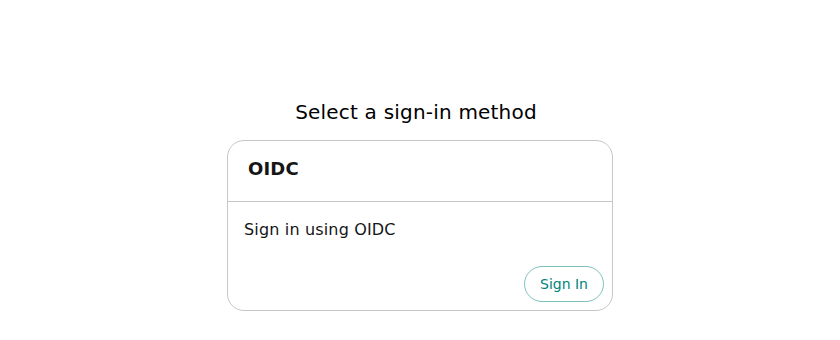
The sign-in page offers the OIDC provider and no guest option.
-
Select Sign In. A pop-up window opens on Keycloak. Sign in as
alicewith the value of$KEYCLOAK_USER_PASSWORD. -
The pop-up closes and the portal home page opens.
-
Open the menu with your name, at the top right, and select Sign out. You return to the sign-in page.
The portal signs a user in only after it has imported that user from Keycloak. The first import runs 15 seconds after the portal starts and the next ones every 5 minutes. For a user who is not in the portal's catalog yet, sign-in fails with "Failed to sign-in, unable to resolve user identity". Wait for the next import and sign in again.
Install a plugin from the marketplace
The sidebar item Marketplace opens the Extensions page. Its Catalog tab lists the plugins you can install, and its Installed packages tab lists the packages the portal runs. This portal has no roles configured and every signed-in user can install plugins (see What ships by default).
- In the Catalog tab, search for
Datadogand select Install on its card. Confirm with Install: the dialog says the change takes effect after a restart. The card now shows Pending install. - Restart the portal with the commands below. The restart installs the plugin before the portal starts, so it takes about as long as the first start.
- Sign in again. Installed packages has one more entry, and the Datadog card offers Uninstall.
kubectl -n "$NAMESPACE" rollout restart deployment/devportal-developer-hub
kubectl -n "$NAMESPACE" rollout status deployment/devportal-developer-hub
Kubernetes stops waiting when a rollout shows no progress for 10 minutes, and rollout status then ends with "exceeded its progress deadline". On a slow node the restart is still running at that point. Run kubectl -n "$NAMESPACE" get pods --watch and continue when the new pod shows 1/1 Running. On a slow node you can also raise the Deployment's progress deadline with global.veecode.deployment.progressDeadlineSeconds (0 keeps the 10-minute Kubernetes default).
The portal stores the installation in its PostgreSQL database, in the marketplace_installations table of the backstage_plugin_extensions database, which is why it survives the restart.
Evaluate without Ingress or an identity provider
For a quick look on a laptop you can skip Ingress, TLS and the identity provider and turn guest sign-in on. The values below set global.veecode.guestAuth.enabled: true, because chart 1.0.4 turns guest sign-in off by default. This is for evaluation only: guest sign-in signs everyone in as ADMIN (user:default/admin). Use a cluster that does not hold the installation above. The chart creates a cluster-scoped ClusterRole named <release>-developer-hub-kubernetes-plugin, for example devportal-developer-hub-kubernetes-plugin. The name does not include the namespace, so set kubernetesPlugin.rbac.namespaceQualifiedName: true when releases with the same name must share a cluster.
Set the variables and create the namespace:
export NAMESPACE=devportal
export DB_PASSWORD="$(openssl rand -hex 16)"
export BACKEND_SECRET="$(openssl rand -hex 16)"

kubectl create namespace "$NAMESPACE"
Start PostgreSQL with the commands of Step 3. Then create the runtime Secret. It needs only the database settings and the backend secret:
kubectl -n "$NAMESPACE" create secret generic veecode-runtime-secrets \
  --from-literal=PG_HOST=devportal-db \
  --from-literal=PG_PORT=5432 \
  --from-literal=PG_USER=devportal \
  --from-literal=PG_PASSWORD="$DB_PASSWORD" \
  --from-literal=PG_DATABASE=devportal \
  --from-literal=BACKEND_SECRET="$BACKEND_SECRET"
Save the values as values-eval.yaml and install the chart without global.host:
cat > values-eval.yaml <<'EOF'
global:
  veecode:
    guestAuth:
      enabled: true
upstream:
  backstage:
    extraEnvVarsSecrets:
      - veecode-runtime-secrets
    appConfig:
      app:
        baseUrl: http://localhost:7007
      backend:
        baseUrl: http://localhost:7007
        cors:
          origin: http://localhost:7007
EOF

helm repo add veecode https://veecode-platform.github.io/next-charts
helm repo update

helm install devportal veecode/devportal --version "$CHART_VERSION" \
  -n "$NAMESPACE" -f values-eval.yaml \
  --wait --timeout 20m
The URLs say http explicitly because the chart builds https:// URLs from global.host when you set it. Forward the service and open http://localhost:7007:
kubectl -n "$NAMESPACE" port-forward svc/devportal-developer-hub 7007:7007
The sign-in page offers Guest and a GitHub sign-in that needs an OAuth app this page does not set up. Choose Guest and select Enter: you land on the home page as Admin.
Disable a default plugin
The default plugins come from the plugin catalog index that the chart pins, not from the chart's values.yaml. When the same plugin is configured in several places, deploy configuration (chart values or operator-supplied app-config) wins over a Marketplace row. For the 18 default plugins, a Marketplace row can only disable a plugin that is not protected. The configuration saved with the row is ignored, so set the configuration in your chart values. Four of the 18 are protected, and the Marketplace cannot disable them.
The installer matches an override by registry, repository, and plugin path, not by tag or digest. Include the full !<plugin path> suffix. A tag or digest in an override sets the plugin version, so a stale digest can pin an older artifact. An override's pluginConfig replaces the default plugin's entire pluginConfig. Include every setting you want to keep.
This example disables Tech Radar:
global:
  dynamic:
    plugins:
      - package: oci://quay.io/veecode/backstage-community-plugin-tech-radar:{{ "{{inherit}}" }}!backstage-community-plugin-tech-radar
        disabled: true
      - package: oci://quay.io/veecode/backstage-community-plugin-tech-radar-backend:{{ "{{inherit}}" }}!backstage-community-plugin-tech-radar-backend
        disabled: true
Save the entries to values-tech-radar-disabled.yaml. Append them to the existing plugin list so the Keycloak entry remains enabled, then upgrade the release:
cat > values-tech-radar-disabled.yaml <<'EOF'
global:
  dynamic:
    plugins:
      - package: oci://quay.io/veecode/backstage-community-plugin-tech-radar:{{ "{{inherit}}" }}!backstage-community-plugin-tech-radar
        disabled: true
      - package: oci://quay.io/veecode/backstage-community-plugin-tech-radar-backend:{{ "{{inherit}}" }}!backstage-community-plugin-tech-radar-backend
        disabled: true
EOF
yq -i '.global.dynamic.plugins += load("values-tech-radar-disabled.yaml").global.dynamic.plugins' values.yaml

helm upgrade devportal "$CHART_REF" "${CHART_VERSION_ARGS[@]}" \
  -n "$NAMESPACE" "${INSTALL_VALUES[@]}" \
  --set global.host="$DEVPORTAL_HOST" \
  --wait --timeout 25m
After the rollout, sign in again and confirm Tech Radar is absent from Installed packages.
What ships by default
The catalog index that the chart pins enables 18 digest-pinned OCI plugins without an entry in your values. The index also lists the Red Hat dynamic Home page, disabled, and the legacy theme is no longer a default. The Installed packages tab lists the enabled plugins, together with the Keycloak module that your values.yaml enables, and any marketplace rows you install:
- The VeeCode home page, the global header and an About page.
- The Marketplace, which is the Extensions page.
- TechDocs, Notifications, Signals and Tech Radar.
- The RBAC screens. The RBAC backend is part of the image, but permission checks are off: the default configuration does not set
permission.enabled: true. Every signed-in user can install plugins from the Marketplace.
The chart also creates a read-only ClusterRole and binding for the Kubernetes plugin (kubernetesPlugin.rbac.enabled, on by default). The image does not load the Kubernetes plugin by default. When releases with the same name share a cluster across namespaces, set kubernetesPlugin.rbac.namespaceQualifiedName: true so the cluster-scoped names include the release namespace.
To read the configuration of a default plugin, extract the catalog index's dynamic-plugins.default.yaml. With CHART_VERSION set as in Step 1, run these commands on a connected machine with Helm, yq 4, and Docker. docker cp copies the file out of the index image without running anything inside it:
helm repo add veecode https://veecode-platform.github.io/next-charts
helm show values veecode/devportal --version "$CHART_VERSION" > chart-values.yaml
export CATALOG_INDEX_SOURCE="$(yq -r '"\(.global.catalogIndex.image.registry)/\(.global.catalogIndex.image.repository):\(.global.catalogIndex.image.tag)"' chart-values.yaml)"
docker create --name devportal-index "$CATALOG_INDEX_SOURCE" true >/dev/null
docker cp devportal-index:/dynamic-plugins.default.yaml .
docker rm devportal-index >/dev/null
Install without internet access
The install-dynamic-plugins init container uses skopeo to pull the catalog index and OCI plugins directly. Kubernetes cluster-level image-mirror settings do not redirect these pulls. Red Hat Developer Hub documents a registries.conf mirror for the same installer and provides the mirror-plugins.sh script to copy the index and its plugins. See RHDH's air-gapped installation guide.
On a connected machine, install Docker, Helm, yq 4, Skopeo 1.20 or later, GNU tar, and jq. Make sure the machine can reach Quay and your mirror registry. Authenticate to both registries before you run the mirror script.
Set the mirror registry name, then read the image and catalog index references from the selected chart. The image digest and the catalog index reference come from the chart values, so the commands follow the chart version in Step 1.
export MIRROR_REGISTRY=registry.example.com

helm repo add veecode https://veecode-platform.github.io/next-charts
helm repo update
helm show values veecode/devportal --version "$CHART_VERSION" > chart-values.yaml

export PORTAL_IMAGE="$(yq -r '"\(.upstream.backstage.image.registry)/\(.upstream.backstage.image.repository)@\(.upstream.backstage.image.digest)"' chart-values.yaml)"
export CATALOG_INDEX_REF="$(yq -r '"oci://\(.global.catalogIndex.image.registry)/\(.global.catalogIndex.image.repository):\(.global.catalogIndex.image.tag)"' chart-values.yaml)"
test "$(yq -r '.upstream.backstage.image.tag' chart-values.yaml)" = "$PORTAL_IMAGE_TAG"

docker create --name devportal-index "${CATALOG_INDEX_REF#oci://}" true >/dev/null
docker cp devportal-index:/dynamic-plugins.default.yaml dynamic-plugins.default.yaml
docker rm devportal-index >/dev/null
yq -r '.plugins[] | select(.disabled != true) | .package | select(test("^oci://")) | sub("!.*$"; "")' \
  dynamic-plugins.default.yaml > default-plugin-refs.txt
test -s default-plugin-refs.txt

curl -fsSLo mirror-plugins.sh \
  https://raw.githubusercontent.com/redhat-developer/rhdh-operator/refs/heads/release-1.10/.rhdh/scripts/mirror-plugins.sh
export CATALOG_INDEX_SOURCE="${CATALOG_INDEX_REF#oci://}"
case "$CATALOG_INDEX_SOURCE" in
  *@sha256:*) export CATALOG_INDEX_MIRROR_REF="$MIRROR_REGISTRY/veecode/plugin-catalog-index:devportal-$CHART_VERSION" ;;
  *) export CATALOG_INDEX_MIRROR_REF="$MIRROR_REGISTRY/${CATALOG_INDEX_SOURCE#*/}" ;;
esac
skopeo copy --all --preserve-digests "docker://$CATALOG_INDEX_SOURCE" \
  "docker://$CATALOG_INDEX_MIRROR_REF"

bash mirror-plugins.sh \
  --plugin-list ./default-plugin-refs.txt \
  --to-registry "$MIRROR_REGISTRY"

mkdir -p offline-bundle
helm pull veecode/devportal --version "$CHART_VERSION" \
  --destination offline-bundle
export OFFLINE_BUNDLE="$PWD/offline-bundle"
test -f "$OFFLINE_BUNDLE/devportal-$CHART_VERSION.tgz"
The helm pull saves the chart archive so the disconnected install never contacts the public Helm repository. Step 6 installs from $OFFLINE_BUNDLE/devportal-$CHART_VERSION.tgz when OFFLINE_BUNDLE is set.
Mirror the portal image, and the PostgreSQL and Keycloak images that Steps 3 and 4 run, so the cluster pulls no image from a public registry. The portal digest comes from the chart values, so the copy follows the chart version in Step 1.
export PORTAL_DIGEST="$(yq -r '.upstream.backstage.image.digest' chart-values.yaml)"
test -n "$PORTAL_DIGEST" && test "$PORTAL_DIGEST" != "null"

skopeo copy --all "docker://$PORTAL_IMAGE" \
  "docker://$MIRROR_REGISTRY/veecode/devportal:$PORTAL_IMAGE_TAG"
skopeo copy --all docker://docker.io/library/postgres:16 \
  "docker://$MIRROR_REGISTRY/library/postgres:16"
skopeo copy --all docker://quay.io/keycloak/keycloak@sha256:6a7217a100bd3e5de4063a27a538ef999a3c5a88c4b4ec0ffc0a642aee7b2597 \
  "docker://$MIRROR_REGISTRY/keycloak/keycloak:26.3.3"

cat > values-mirror.yaml <<EOF
upstream:
  backstage:
    image:
      registry: $MIRROR_REGISTRY
      repository: veecode/devportal
EOF
Point Steps 3 and 4 at the mirrored PostgreSQL and Keycloak images before you run them:
export POSTGRES_IMAGE="$MIRROR_REGISTRY/library/postgres:16"
export KEYCLOAK_IMAGE="$MIRROR_REGISTRY/keycloak/keycloak:26.3.3"
Copy the offline-bundle directory, values-mirror.yaml, and registries.conf (created below) to the machine that reaches the cluster. There, set OFFLINE_BUNDLE to the bundle directory path, MIRROR_REGISTRY to the same registry name, and export the two image variables above before Step 1.
The catalog index holds the default plugin file (dynamic-plugins.default.yaml). The commands extract the OCI references of its enabled plugins, remove the !subpath suffix, and give them to RHDH's script with --plugin-list. Copy the chart's catalog index separately with Skopeo; the RHDH script reads Red Hat's index format. From chart 1.0.4 the chart reads the index by digest. The copy keeps that digest (--preserve-digests) and tags it devportal-<chart version> in the mirror, so a registry that removes untagged images keeps it. The script writes rhdh-plugin-mirroring-summary.txt with the plugin source-to-mirror mappings. If your values override the image or global.catalogIndex.image, use those references instead of the chart defaults above.
This procedure assumes the connected machine can reach both Quay and the mirror registry. For a fully disconnected transfer, use RHDH's documented --to-dir and --from-dir flow for the default plugin list, and copy the chart index separately with Skopeo. To point the chart at a mirrored catalog index, see Configure the plugin catalog index.
Create a ConfigMap with the registry mapping. Set MIRROR_REGISTRY to a registry name that the cluster can resolve and reach.
cat > registries.conf <<EOF
[[registry]]
prefix = "quay.io/veecode"
location = "$MIRROR_REGISTRY/veecode"
EOF

kubectl -n "$NAMESPACE" create configmap plugin-registry-mirror \
  --from-file=rhdh-registries.conf=registries.conf \
  --dry-run=client -o yaml | kubectl apply -f -
Add the volume and mount below to the chart values you pass to Helm. Append the volume to upstream.backstage.extraVolumes and the mount to the install-dynamic-plugins entry under upstream.backstage.initContainers.
upstream:
  backstage:
    extraVolumes:
      - name: plugin-registry-mirror
        configMap:
          name: plugin-registry-mirror
    initContainers:
      - name: install-dynamic-plugins
        volumeMounts:
          - name: plugin-registry-mirror
            mountPath: /etc/containers/registries.conf.d/rhdh-registries.conf
            subPath: rhdh-registries.conf
            readOnly: true
This snippet shows only the additions. Helm replaces list values, so preserve every existing volume, volume mount, and field of the install-dynamic-plugins entry for the chart version you use. The full defaults are in helm show values "$CHART_REF" "${CHART_VERSION_ARGS[@]}" once Step 6 sets those variables, or helm show values veecode/devportal --version "$CHART_VERSION" on a connected machine. RHDH describes the same list behavior and mount path in its Helm mirror procedure.
With values-mirror.yaml passed to Helm, the portal image comes from the mirror registry. With the registries.conf mapping mounted, the installer keeps the chart's catalog-index reference and pulls it and the default plugins from the mirror. The chart archive comes from the offline-bundle directory. Nothing is pulled from a public registry or repository. Run the Helm install command in Step 6, then check the installer logs and wait for the portal to become ready:
kubectl -n "$NAMESPACE" logs deployment/devportal-developer-hub -c install-dynamic-plugins
kubectl -n "$NAMESPACE" rollout status deployment/devportal-developer-hub
Version and lineage
Step 1 sets the chart version and the image tag it installs. The chart pins that image by digest. Never point production at :edge.
The chart source is veecode-platform/devportal-chart. It is a renamed fork of redhat-developer/rhdh-chart pinned at backstage-7.0.1.
Attribution
The OIDC and registry-mirroring instructions on this page are adapted from Red Hat Developer Hub documentation, licensed under the Apache License 2.0. VeeCode modified the text: it replaced Red Hat build of Keycloak with Keycloak, changed the configuration to the devportal chart, and added the steps for the Ingress, the certificate, the database, and registry mirroring.
Was this helpful?