Run with Docker
Get your DevPortal instance running in under 5 minutes.
Run DevPortal with Docker
This guide explains how to run the VeeCode DevPortal using standard Docker commands. This is useful for quick testing, local development, or if you prefer not to use the VKDR CLI.
Prerequisites
- Docker Engine installed and running.
- Docker Compose installed and running.
- You can alternatively use Docker Desktop for Windows/Mac/Linux.
- Other options like Podman, OrbStack, Rancher Desktop, or Colima will probably work as well with some minor adjustments.
Quick Start (Docker Run)
You can simply run the following command to start a DevPortal instance locally:
# the tag pins one release — replace it with the current release tag
docker run --rm --name devportal -d -p 7007:7007 veecode/devportal:2.1.3
This will start a DevPortal instance running on http://localhost:7007.
Use a version tag, as above. veecode/devportal:latest is the 2.x line and never points at a 3.x image.
The default behavior enables "guest" authentication as an admin user. The default catalog will be populated with a built-in catalog for demo purposes.
You can stop this container with:
docker stop devportal
Quick Start (Docker Compose)
Alternatively, you can use docker compose to start a DevPortal instance locally with exactly the same result:.
Create a docker-compose.yml file:
services:
  devportal:
    image: veecode/devportal:2.1.3
    ports:
      - "7007:7007"
Run it with:
docker compose up -d
Stop it with:
docker compose down
What you get
The DevPortal instance will be running on http://localhost:7007, with very limited functionality but still a good starting point.
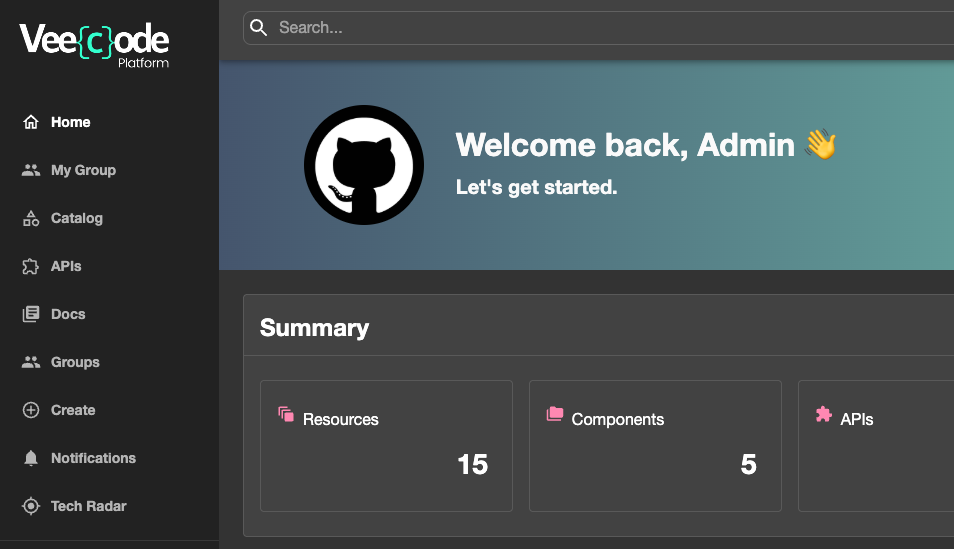
Points to notice:
- "Guest" authentication enabled as an admin user ("user:default/admin", "group:default/admins", "role:default/admin" with all permissions granted).
- The catalog is populated with built-in demo entities (see What's in the demo catalog below).
- The container loads several config files in a defined precedence order. Your custom file at
/app/app-config.local.yamloverrides the base and preset defaults. See Custom Configuration for the full merge order. - Plugins are activated via presets (
VEECODE_PRESETS) — the image comes with many bundled plugins that presets enable at boot. You can also mount/app/dynamic-plugins.yamlto add operator-level plugin overrides on top.
We will talk more about these subjects later on, but understand there are many possible ways to extend and configure DevPortal container without rebuilding it (or making a derived image).
What's in the demo catalog
When you run veecode/devportal:2.1.3 with no custom config, the catalog is not empty by accident — it is populated from /app/examples/ inside the image. Knowing what's in there matters because (a) you can read these files as concrete examples of how every entity kind is declared, and (b) you need a strategy for replacing them when you go beyond the demo.
The demo data lives in these files (you can inspect them directly with docker exec):
docker exec devportal ls /app/examples/
docker exec devportal cat /app/examples/entities.yaml
| File | What it contains |
|---|---|
entities.yaml | System (examples), Components (example-website, example-node-app), an inline gRPC API (example-grpc-api) |
org.yaml | Users and Groups (guests, admins) |
apis.yaml | A live OpenAPI from apis.guru (loaded via remote ref) and a gRPC API |
resources.yaml | Demo Resources — databases, environments, and similar infrastructure entities |
clusters.yaml | A cluster Resource |
techdocs/catalog-info.yaml | A Component with TechDocs enabled (good reference for TechDocs annotation usage) |
template-nodejs/template.yaml | Scaffolder Template that creates a Node.js service repo on GitHub |
template-openapi/template.yaml | Scaffolder Template that generates a Kong deck config from an OpenAPI spec |
template-azure-nodejs/template.yaml | Variant of the Node.js template targeting Azure DevOps |
These files are registered as catalog locations in app-config.production.yaml, which is one of the layered configs loaded on startup. That is why they appear out of the box.
The three demo Templates appear in the Create tab but will fail at execution unless you provide the relevant secrets (a GitHub token for the Node.js and OpenAPI templates, a Kong connection for the OpenAPI template, an Azure DevOps PAT for the Azure template). They are useful as examples of template structure even if you don't run them.
Replacing the demo catalog
catalog.locations[] is additive in Backstage's config merge — entries from app-config.local.yaml are appended to (not substituted for) the ones in app-config.production.yaml. This means:
- Adding your own entities alongside the demo: mount your own
catalog-info.yamland add it as a location inapp-config.local.yaml. Both sets will appear. - Fully removing the demo entities: mount a replacement
app-config.production.yamlthat omits the/app/examples/entries. You must preserve all the other settings from the original (baseUrl, CORS, auth, RBAC paths, etc.) — only do this when you intentionally want a clean catalog.
See Custom Catalog for the concrete YAML.
Next Steps
Now that you have DevPortal running, you can customize it:
- Quick Setup with Presets: Use
VEECODE_PRESETSto activate GitHub, GitLab, Azure DevOps, and other integrations at boot - Custom Configuration: Mount custom
app-config.local.yamlto configure integrations, authentication, and more - Dynamic Plugins: Enable, disable, and configure plugins using
dynamic-plugins.yaml - Custom Catalog: Add your own components, APIs, and resources to the catalog
- Kubernetes (Helm chart): Deploy to a real Kubernetes cluster using the
veecode-devportal-platformHelm chart
Was this helpful?