Simple branding
There is an entire branding section in the appConfig section of DevPortal configuration that lets you pick one of the pre-defined theme variants and its light/dark options, allowing you top customize every single aspect from it.
The default config
The default branding values are defined in app-config.yaml (base layer). Override them in app-config.local.yaml (mounted at /app/app-config.local.yaml):
app:
  branding:
    fullLogo: https://veecode-platform.github.io/support/logos/logo.svg
    iconLogo: https://veecode-platform.github.io/support/logos/logo-mobile.png
    fullLogoWidth: 150
    theme:
      light:
        variant: "backstage"
        palette:
          navigation:
            background: "#222222"
      dark:
        variant: "backstage"
        palette:
          navigation:
            background: "#222222"
fullLogoDarkfullLogoDark is read by CompanyLogo.tsx and applied as the logo when the dark theme is active. Set it to a separate URL if you want distinct light and dark logos. The "new form breaks sidebar, check later" note in the source applies to a commented-out object form of fullLogo (a light/dark map), not to fullLogoDark.
Will result in this:
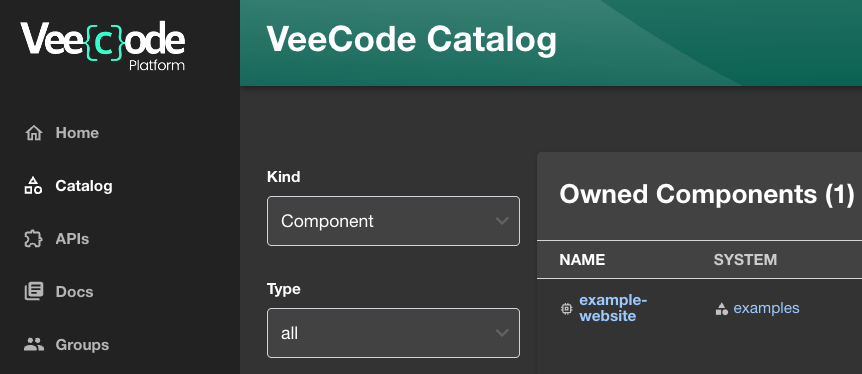
A few points to remember:
- You can provide URLs to your custom resources, but remember those must be available to end users' browsers.
- You must add the base URL of those resources to the
csp.img-srclist.
External domains and CSP
DevPortal ships with a Content-Security-Policy that restricts which domains can serve images (and other resource types) to the browser. If your logo, icon, or favicon URL is on a domain not already allowed, the browser blocks it — the image silently falls back to default, and the console shows a CSP violation.
Extend backend.csp.img-src in your app-config.local.yaml to add your domain:
backend:
  csp:
    img-src:
      - "'self'"
      - "data:"
      - "https://your-cdn.example.com"
      # ...plus every domain your instance's current effective config already allows
Backstage's config loader replaces array-valued config on override rather than appending to it. If you set backend.csp.img-src without including everything already in the default list, you don't just fail to add your domain — you break every other domain that was previously allowed (analytics, GitHub avatars, etc.). Read your instance's current effective img-src list before overriding it, and repeat it in full alongside your addition. The same rule applies to connect-src, script-src, style-src, and any other CSP directive.
If you're embedding an external tool via <iframe> (a dashboard, a status page) rather than serving an image, the directive you need is backend.csp.frame-src, not img-src. A missing frame-src entry is worse to debug than a missing img-src one: there's no console error at all, just a blank space where the iframe should be.
Troubleshooting:
| Symptom | Cause | Fix |
|---|---|---|
| Logo/icon doesn't render, falls back to default | Domain missing from backend.csp.img-src | Extend img-src with your domain, keeping all existing entries |
Extending img-src broke unrelated images (avatars, analytics) | The override replaced the array instead of extending it | Re-add the full previous list plus your addition |
| Embedded iframe shows blank, no console error | Domain missing from backend.csp.frame-src | Extend frame-src with your domain, keeping all existing entries |
A Simple config
A simple and funny config just to show some settings change:
app:
  branding:
    theme:
      light:
        variant: "backstage"
        typography:
          fontFamily: "Verdana"
          htmlFontSize: 20 # smaller is bigger
          h1:
            fontFamily: "Comic Sans MS"
        palette:
          text:
            primary: "#000066"
            secondary: "#0099ff"
      dark:
        variant: "backstage"
        typography:
          fontFamily: "Verdana"
          htmlFontSize: 20 # smaller is bigger
          h1:
            fontFamily: "Comic Sans MS"
        palette:
          text:
            primary: "#ffcc00"
            secondary: "#0099ff"
Will result in this:
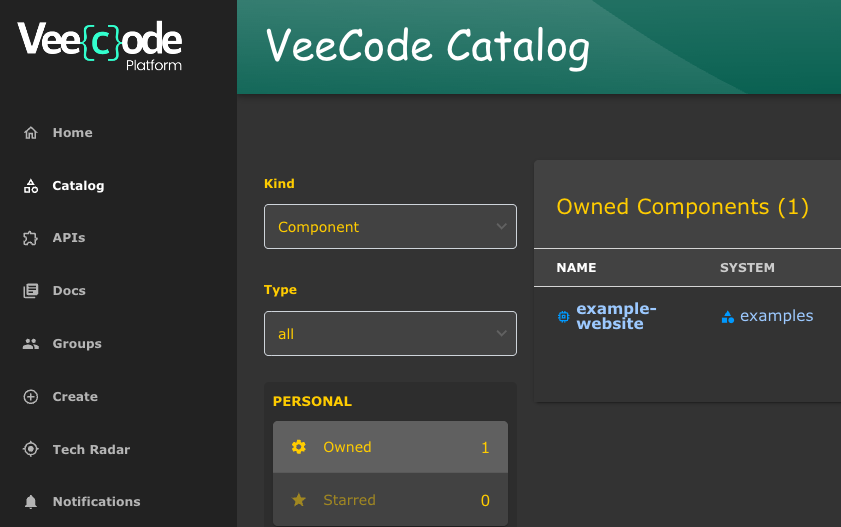
Other examples
A complete config for the "backstage" variant theme settings is below (obtained from RHDH: Default Backstage theme color palette):
Most of RHDH theme settings are also available in the DevPortal, feel free to try them. We have made our "home" and "header" plugins compatible with RHDH, so chances are you will be ok. The RHDH theme variant "rhdh" is also available in the DevPortal, but we like "backstage" better.
app:
  branding:
    theme:
      light:
        variant: "backstage"
        mode: "light"
        palette:
          background:
            default: "#F8F8F8"
            paper: "#FFFFFF"
          banner:
            closeButtonColor: "#FFFFFF"
            error: "#E22134"
            info: "#2E77D0"
            link: "#000000"
            text: "#FFFFFF"
            warning: "#FF9800"
          border: "#E6E6E6"
          bursts:
            backgroundColor:
              default: "#7C3699"
            fontColor: "#FEFEFE"
            gradient:
              linear: "linear-gradient(-137deg, #4BB8A5 0%, #187656 100%)"
            slackChannelText: "#ddd"
          errorBackground: "#FFEBEE"
          errorText: "#CA001B"
          gold: "#FFD600"
          highlight: "#FFFBCC"
          infoBackground: "#ebf5ff"
          infoText: "#004e8a"
          link: "#0A6EBE"
          linkHover: "#2196F3"
          navigation:
            background: "#171717"
            color: "#b5b5b5"
            indicator: "#9BF0E1"
            navItem:
              hoverBackground: "#404040"
            selectedColor: "#FFF"
            submenu:
              background: "#404040"
          pinSidebarButton:
            background: "#BDBDBD"
            icon: "#181818"
          primary:
            main: "#1F5493"
          status:
            aborted: "#757575"
            error: "#E22134"
            ok: "#1DB954"
            pending: "#FFED51"
            running: "#1F5493"
            warning: "#FF9800"
          tabbar:
            indicator: "#9BF0E1"
          textContrast: "#000000"
          textSubtle: "#6E6E6E"
          textVerySubtle: "#DDD"
          warningBackground: "#F59B23"
          warningText: "#000000"

      dark:
        variant: "backstage"
        mode: "dark"
        palette:
          background:
            default: "#333333"
            paper: "#424242"
          banner:
            closeButtonColor: "#FFFFFF"
            error: "#E22134"
            info: "#2E77D0"
            link: "#000000"
            text: "#FFFFFF"
            warning: "#FF9800"
          border: "#E6E6E6"
          bursts:
            backgroundColor:
              default: "#7C3699"
            fontColor: "#FEFEFE"
            gradient:
              linear: "linear-gradient(-137deg, #4BB8A5 0%, #187656 100%)"
            slackChannelText: "#ddd"
          errorBackground: "#FFEBEE"
          errorText: "#CA001B"
          gold: "#FFD600"
          highlight: "#FFFBCC"
          infoBackground: "#ebf5ff"
          infoText: "#004e8a"
          link: "#9CC9FF"
          linkHover: "#82BAFD"
          mode: "dark"
          navigation:
            background: "#424242"
            color: "#b5b5b5"
            indicator: "#9BF0E1"
            navItem:
              hoverBackground: "#404040"
            selectedColor: "#FFF"
            submenu:
              background: "#404040"
          pinSidebarButton:
            background: "#BDBDBD"
            icon: "#404040"
          primary:
            dark: "#82BAFD"
            main: "#9CC9FF"
          secondary:
            main: "#FF88B2"
          status:
            aborted: "#9E9E9E"
            error: "#F84C55"
            ok: "#71CF88"
            pending: "#FEF071"
            running: "#3488E3"
            warning: "#FFB84D"
          tabbar:
            indicator: "#9BF0E1"
          textContrast: "#FFFFFF"
          textSubtle: "#CCCCCC"
          textVerySubtle: "#727272"
          warningBackground: "#F59B23"
          warningText: "#000000"
Please understand the file above is just a dump of the "backstage" variant's default values. You can simply refer to it and the default values will apply:
app:
  branding:
    theme:
      light:
        variant: "backstage"
        mode: "light"
      dark:
        variant: "backstage"
        mode: "dark"
Was this helpful?