Example: Frontend Plugin
A frontend plugin can de bootstrapped with the command below:
yarn new --select frontend-plugin --option pluginId=my-front-plugin
This creates a basic React-based plugin with a page/component and plugin exports at the plugins/my-front-plugin/src folder.
Edit plugin
Edit the components/ExampleComponent/ExampleComponent.tsx file to change some labels and messages. Don't spend too much time trying to understand the code, it's just an example.
Check the plugin registering
Look at the plugin.ts and routes.ts files to understand how the plugin is registered and defines a page mounted to a path.
Check the plugin UI
Look at the components folder to understand how the plugin UI is defined based on known Backstage and Material UI elements.
Wire the plugin into Backstage
The plugin has already wired a route into the app UI so it already accessible. Check these lines in the packages/app/src/App.tsx file:
import { MyFrontPluginPage } from '@internal/plugin-my-front-plugin';
// ...
<Route path="/my-front-plugin" element={<MyFrontPluginPage />} />
// ...
Add plugin to Sidebar (optional)
You can add a sidebar link to your plugin by editing the packages/app/src/components/Root/Root.tsx file and look for the SideBarGroup named "Menu". Add a "SidebarItem" to the group:
// ...
      <SidebarGroup label="Menu" icon={<MenuIcon />}>
 ...
        <SidebarItem icon={CreateComponentIcon} to="create" text="Create..." />
        <SidebarItem icon={LibraryBooks} to="my-front-plugin" text="My Plugin" />
 ...
      </SidebarGroup>
// ...
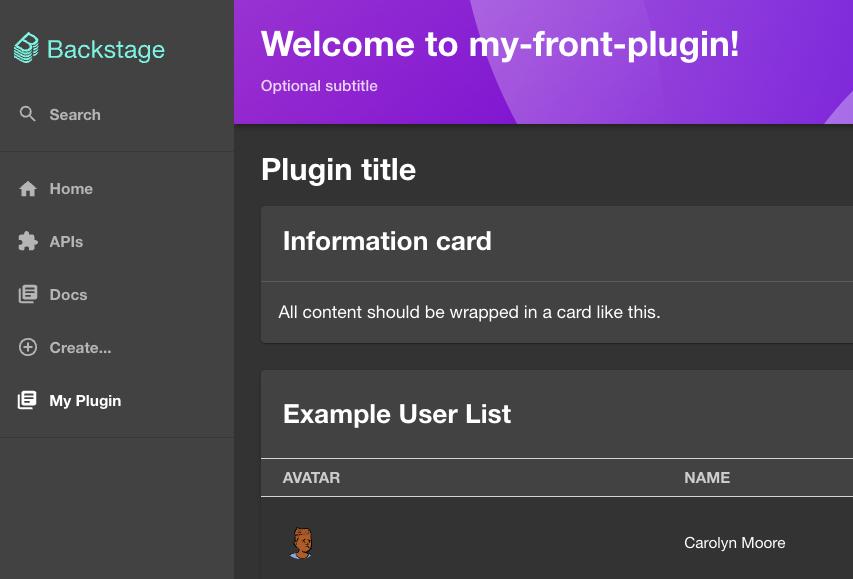
Next:
- Add UI elements (cards, widgets) using Backstage components and Material UI.
- Add routes, entity pages, or catalog integrations as needed.
Was this helpful?