Example: Frontend Plugin
A frontend plugin can be scaffolded inside a workspace with the command below:
# From the workspace root
yarn new --select frontend-plugin-legacy --option pluginId=my-front-plugin
The workspace app uses the legacy frontend system, so yarn new offers frontend-plugin-legacy for UI plugins.
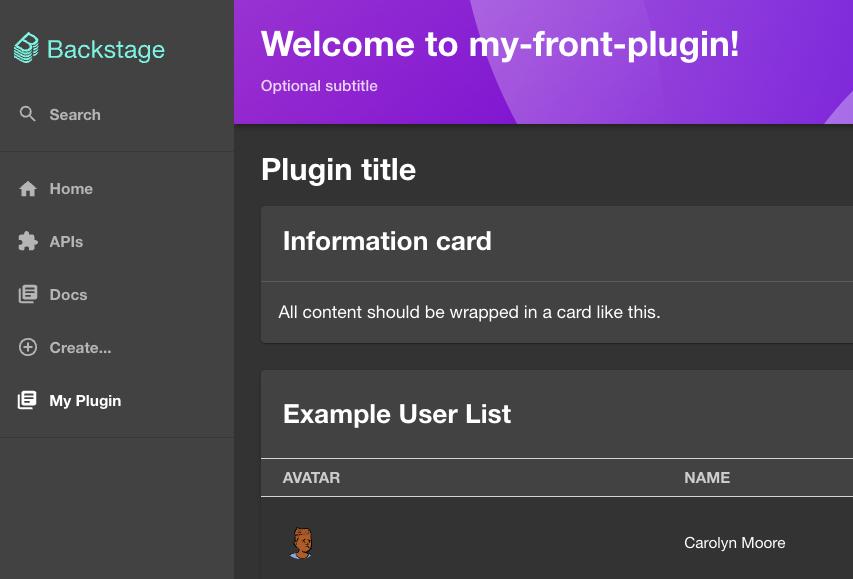
This creates a basic React-based plugin with a page/component and plugin exports under the plugins/my-front-plugin/src folder.
Edit plugin
Edit the components/ExampleComponent/ExampleComponent.tsx file to change some labels and messages. Don't spend too much time trying to understand the code, it's just an example.
Check the plugin registering
Look at the plugin.ts and routes.ts files to understand how the plugin is registered and defines a page mounted to a path.
Check the plugin UI
Look at the components folder to understand how the plugin UI is defined based on known Backstage and Material UI elements.
Develop in the workspace host
The workspace development host already wires the new page into its app shell so it is accessible during development. The host route lives in packages/app/src/App.tsx:
import { MyFrontPluginPage } from '@internal/backstage-plugin-my-front-plugin';
// ...
<Route path="/my-front-plugin" element={<MyFrontPluginPage />} />
// ...
You can add a sidebar link to the host by editing packages/app/src/components/Root/Root.tsx and looking for the SideBarGroup named "Menu". Add a "SidebarItem" to the group:
// ...
      <SidebarGroup label="Menu" icon={<MenuIcon />}>
 ...
        <SidebarItem icon={CreateComponentIcon} to="create" text="Create..." />
        <SidebarItem icon={LibraryBooks} to="my-front-plugin" text="My Plugin" />
 ...
      </SidebarGroup>
// ...
These edits apply to the development host only. They let you iterate on the UI with yarn start at the workspace root. DevPortal never reads them: the product portal learns about your pages from dynamic plugin configuration instead.
Export the plugin
Build and export this package with the commands in Creating Your Own Plugin. The 3.1 operator entry uses ./dynamic-plugins-src/<exported-directory>, mounted from dynamic-plugins-src-dev.
Expose the plugin to DevPortal
Declare where the UI mounts in a pluginConfig.dynamicPlugins.frontend block, as described in Wiring a Frontend Plugin. The block names the route, the sidebar entry, and any entity tabs or cards:
plugins:
  - package: ./dynamic-plugins-src/internal-backstage-plugin-my-front-plugin
    disabled: false
    pluginConfig:
      dynamicPlugins:
        frontend:
          internal.backstage-plugin-my-front-plugin:
            dynamicRoutes:
              - path: /my-front-plugin
                importName: MyFrontPluginPage
                menuItem:
                  icon: LibraryBooks
                  text: My Plugin Page
                  enabled: true
Export the package and start devportal-local as described in Creating Your Own Plugin. Open the configured route in the browser and confirm the sidebar item. If the page is missing, check http://localhost:7007/api/dynamic-plugins-info/loaded-plugins to see whether the package loaded.
Next:
- Add UI elements (cards, widgets) using Backstage components and Material UI.
- Add routes, entity pages, or catalog integrations as needed.
Was this helpful?