Example: Custom Action
This page covers creating a new action in TypeScript. If you're looking for how to use existing actions inside a template, see Available Actions.
A Scaffolder action is a backend module: it extends the Scaffolder backend plugin instead of running standalone. A custom action for the Backstage scaffolder can be bootstrapped inside a workspace with the command below:
# From the workspace root: create a new custom action module
yarn new --select scaffolder-backend-module --option moduleId=my-custom-action
This creates the folder plugins/scaffolder-backend-module-my-custom-action, as well as an example action in src/actions.
Export the action module
Build and export this package with the commands in Creating Your Own Plugin. The 3.1 operator entry uses ./dynamic-plugins-src/<exported-directory>, mounted from dynamic-plugins-src-dev. A backend module entry has no pluginConfig.
You can delete or rename the example action file to dummy.ts.
Create the action file
Create the action file dummy.ts under src/actions and write this code:
import { createTemplateAction } from '@backstage/plugin-scaffolder-node';

export function createDummyAction() {
  // For more information on how to define custom actions, see
  //   https://backstage.io/docs/features/software-templates/writing-custom-actions
  return createTemplateAction({
    id: 'acme:dummy',
    description: 'Runs a dummy action',
    schema: {
      input: {
        message: z =>
          z.string({
            description:
              "This is an example message parameter, it just cannot be 'foo'",
          }),
      },
    },
    async handler(ctx) {
      ctx.logger.info(
        `Running example dummy action with parameters: ${ctx.input.message}`,
      );

      if (ctx.input.message === 'foo') {
        throw new Error(`message cannot be 'foo'`);
      }
    },
  });
}
Notice the plugin's module.ts file that registers the custom action:
import { createBackendModule } from "@backstage/backend-plugin-api";
import { scaffolderActionsExtensionPoint  } from '@backstage/plugin-scaffolder-node';
import { createDummyAction } from "./actions/dummy";

/**
 * A backend module that registers the action into the scaffolder
 */
export const scaffolderModule = createBackendModule({
  moduleId: 'dummy-action',
  pluginId: 'scaffolder',
  register({ registerInit }) {
    registerInit({
      deps: {
        scaffolderActions: scaffolderActionsExtensionPoint
      },
      async init({ scaffolderActions}) {
        scaffolderActions.addActions(createDummyAction());
      }
    });
  },
})
The module follows the same rule. A workspace created with --role frontend-plugin holds only packages/app and has no packages/backend/src/index.ts, so host registration does not apply there. When your workspace was created with --role backend-plugin, it has packages/backend/src/index.ts; add the module there for host development only:
// ...
backend.add(import('@internal/backstage-plugin-scaffolder-backend-module-my-custom-action'));
// ...
backend.start();
DevPortal attaches the exported dynamic module to its own Scaffolder plugin automatically, without this file.
Test the action
Export the package, start devportal-local, and apply later edits as described in Creating Your Own Plugin.
Open the action list at http://localhost:3000/create/actions during host development, or at http://localhost:7007/create/actions against devportal-local, to check that the action is loaded:
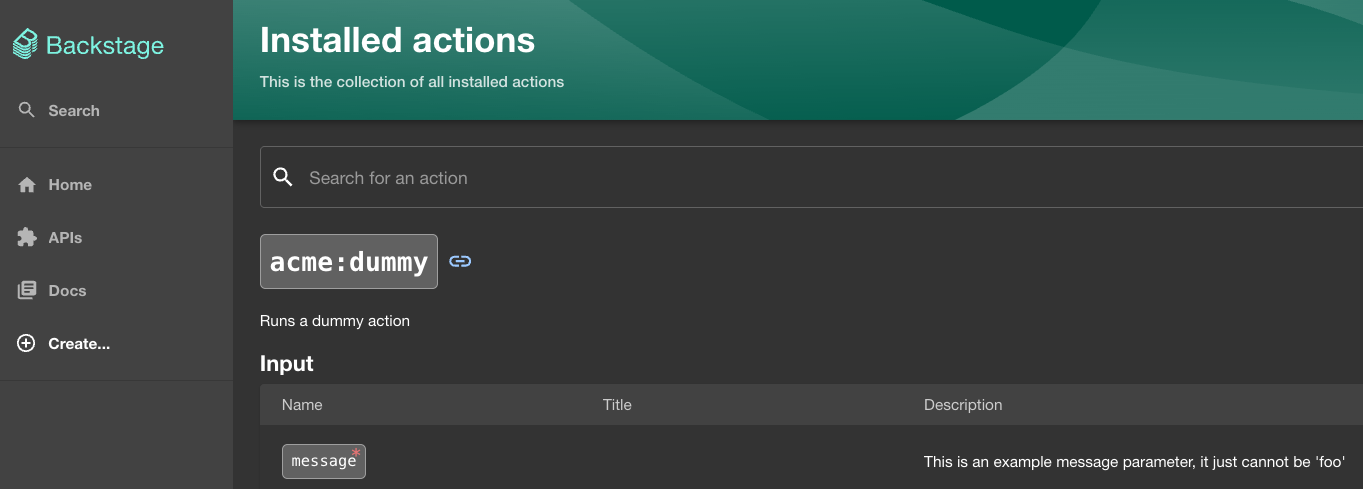
A template can then invoke the action by its id, acme:dummy.
Default actions
A default DevPortal install ships 16 Scaffolder actions and no templates: catalog:annotate, catalog:fetch, catalog:register, catalog:scaffolded-from, catalog:template:version, catalog:timestamping, catalog:write, debug:log, debug:wait, fetch:plain, fetch:plain:file, fetch:template, fetch:template:file, fs:delete, fs:readdir, and fs:rename. There are no publish: actions by default. Open /create/actions in the running portal to see the current list, which grows as you add modules like this one.
Was this helpful?